Track Installation
Home
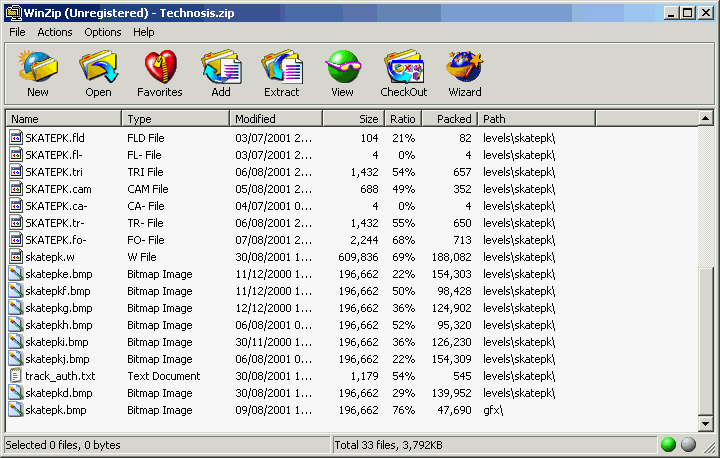
The pic shows that the track has been saved into a folder called "skatepk", and into the correct path.
There are 2 groups of files :-
the main track files that have the path "levels\skatepk" and
the gfx files xxx.bmp and xxx.bmq.
The .bmp file is required but the .bmq file is not usually needed.
The .bmp file is the main file and is the pic shown when you select that track.
-----------------------------
Track Installation
When you have double clicked on the zip file you download
you will see winzip popup and display the
file list similar to that in "track_a" pic.
press ctrl and A
this will highlight all the files in the archive.
Now if the files have the correct path like shown in the pic above then u are ready to extract them.
now press ctrl and E
This will activate the destination folder window shown in the pic below
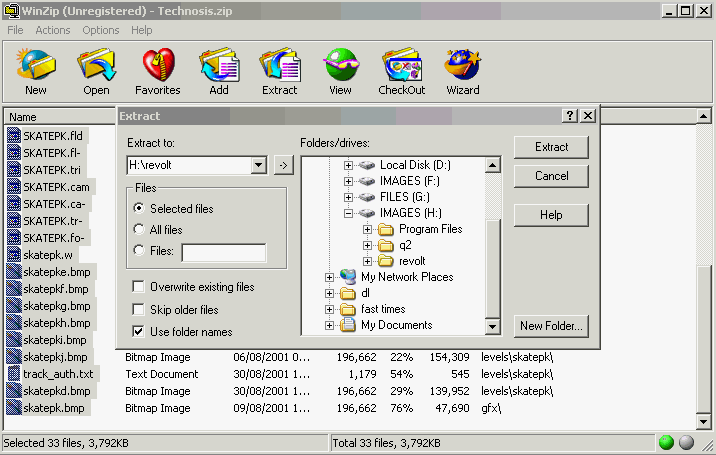
Now you must select the destination folder.
First select the drive then the correct path/folder in the main (folders/drives:) window
As you click on each drive and the folder the path will appear in the "Extract to:" window.
I have installed revolt on another partition and at the root of that drive so I only have to select the drive
and the revolt folder. It makes no diff if u have installed rv to the default folder in
c:/program files/acclaim...../revolt ( I think that’s the default any way )
when you have done this you just need to hit the extract button
the window will disappear and the red indicator will turn on ( next to the green one bottom left on pic)
then the green one will reappear. You may not even see the red one if you have a quick pc.
Also some tracks require an installer program to be run , it will say in the readme file how and what you
should do. I know of 2 tracks that require this , they are Supermarket3 and Re-Ville.